Current
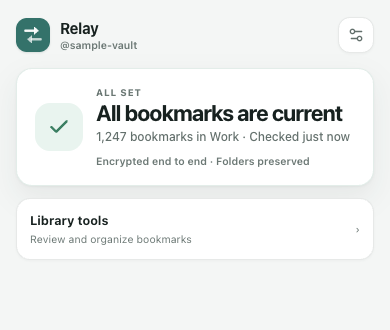
See which profile is active, how many bookmarks are protected, and when Relay last checked.
Private bookmark sync
Relay keeps Chrome, Brave, Edge, and other supported Chromium browsers aligned through one end-to-end encrypted vault. Chrome is public, the separate Edge package is in Partner Center setup, and Firefox Desktop is ready and awaiting Mozilla review. No email account. No readable cloud copy.
Free for two supported browsers and up to 500 stored bookmarks.
One glance, one decision
Relay changes its first screen with the state of this browser. When everything is safe, there is nothing to press. When attention is needed, one clear action leads.
See which profile is active, how many bookmarks are protected, and when Relay last checked.
Review what will be added or kept before Relay changes the local bookmark tree.
Keep the local set as a new profile when a large difference looks intentional.
Sign in
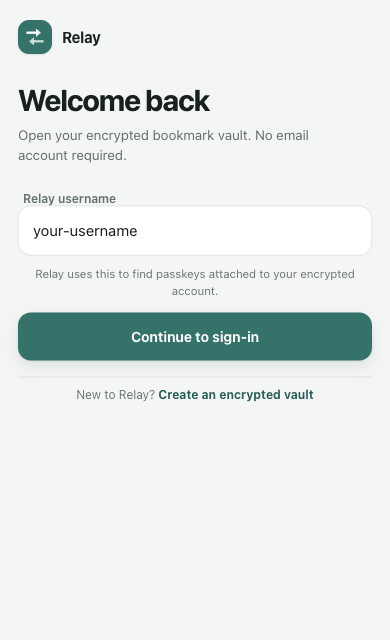
Enter the username you chose, then continue. Relay shows the sign-in method available in this browser without making you guess.
Add a browser
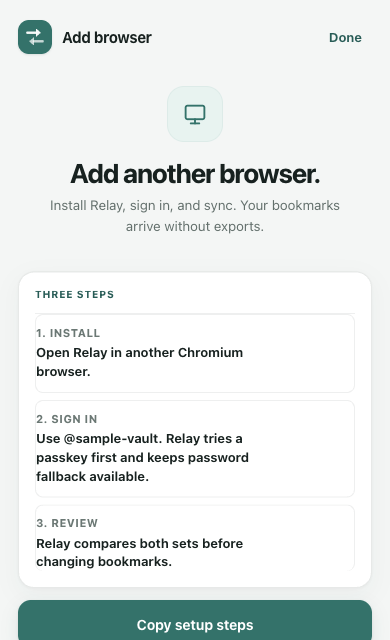
Install Relay in another supported browser, sign into the same vault, and review both bookmark sets before anything changes. The separate Edge listing is in preparation; Firefox Desktop is awaiting Mozilla review.
Profiles
Keep work, personal, client, or research libraries separate. Switch intentionally, archive old sets, and save the current browser before a large sync.
Explore profiles, Tidy, Undo, and Time Machine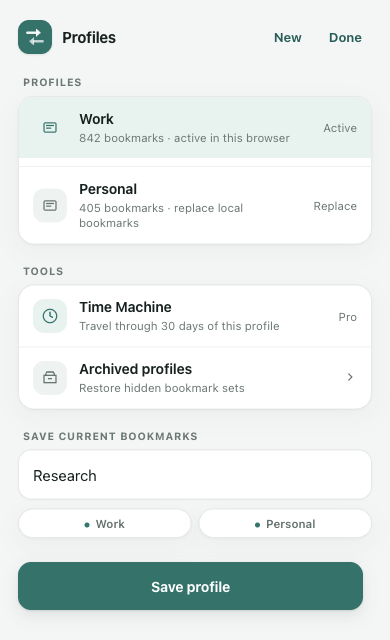
The trust boundary
Bookmark titles, URLs, folders, profiles, and restore history are encrypted locally before upload. The service receives ciphertext and the limited metadata needed to operate your vault.
Review the trust centerReady when you are
Start free with two supported browsers. Upgrade only when you need more browsers, larger libraries, auto-sync, and encrypted history.